Making Sense of Starlink Roam Plans
(When You’re Already Overwhelmed)

If you’ve ever sat staring at the Starlink Roam plans, wondering which one actually fits how you travel, you’re not alone. I’ve been there too – browser tabs open, Facebook threads full of half-right information, and a creeping feeling that you’re about to choose the wrong plan and waste a lot of money.
Over the past couple of years on the road, Starlink has quietly changed prices, data limits, and even how “pause” works, and most of us only discover this when something stops working as we expected. Free pause turned into paid Standby, 50GB became 100GB, in-motion rules shifted, and the simple “I’ll just turn it on when I travel” idea got buried in the fine print.
I built the Starlink Roam Dashboard to untangle all of that for Australian travellers, and to answer one simple question:
“What’s the cheapest Starlink setup that still actually works for how I travel?”
Buying it
Hardware prices change, so check the Starlink website for current Australian pricing.
Starlink does offer special deals intermittently – again, check the website.
As a rough guide, the Gen 3 dish and router kit is in the $500-600 AUD range, and the Mini is a bit cheaper.
If you’re about to buy, use my referral link, and we both get a free month of service 30 days after you activate. No catch.
Get one month free with my referral link
Why Starlink Roam Got So Confusing
On paper, there are only a handful of options: Standby, Roam 100GB, Roam Unlimited, or cancelling your account between trips. In practice, each one has hidden trade-offs once you start doing more than a quick weekend away.
A few examples from my own setup and from other nomads I work with:
- You stay on Roam 100GB all year “just in case”, even when you’re at home on good 4G, and end up paying close to a thousand dollars a year you didn’t need to.
- You drop to Standby over the summer, then discover that in-motion use has been disabled, and you can’t keep working while you roll between spots.
- You cancel completely between trips to save money, then discover there’s a capacity risk when you try to reactivate in a busy cell.
None of this is obvious when you just look at the Starlink marketing page. It only becomes obvious once you combine real pricing, seasonal patterns and what you actually do online: remote work, streaming, kids’ YouTube, or just basic email and maps.
What the Dashboard Shows You
The Starlink Roam Dashboard (now updated to June 2026 prices) brings all current Australian Roam options together in one place and lets you view them the way a traveller does.
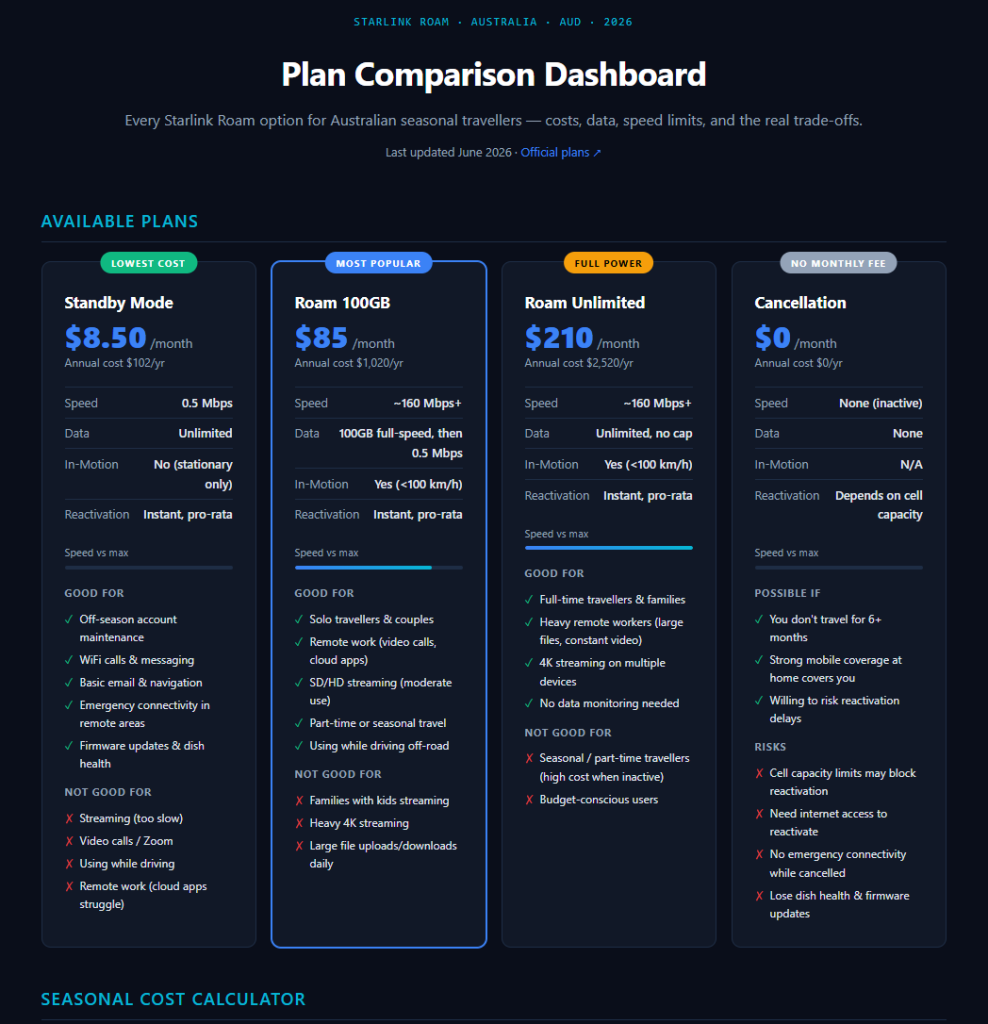
Here’s what you can see at a glance:
- All plans side by side – Standby, Roam 100GB, Roam Unlimited and fully cancelled, with monthly and annual costs, speed, in-motion rules and data limits on one page.
- Seasonal cost calculator – Slide how many months you’re travelling versus at home and instantly see what each strategy costs per year.
- Real-world strategies – Scenarios like “Winter Lap”, “Full-Time Remote Worker”, “Weekend Trips” and “Maximum Budget Saving”, with example numbers so you can see what fits closest to your life.
- Recent changes in plain English – Things like Standby losing in-motion use, the 100GB upgrade, and the end of free pause, all explained without marketing fluff.
If you’re already using Starlink, you’ll probably see your current pattern reflected somewhere in there and be able to tell quickly whether you’re overspending or under-specced.
A Couple of Example Setups
Here are two common patterns I see with travellers.
- Seasonal traveller (4–5 month lap each year)
You use Roam 100GB only while travelling, then drop to Standby when you’re at home. That keeps you on the network, keeps your dish updated and online for emergencies, and still saves several hundred dollars a year compared with staying on full Roam all year. - Full-time remote worker
If you’re like me and actually run a business from the road, Roam 100GB at 160 Mbps+ is usually enough if you keep an eye on your usage. If you’re constantly on Zoom, moving big files or sharing with a family full of streamers, Unlimited starts to make more sense simply because you stop thinking about data caps.
In both cases, the “right” choice depends less on the marketing name of the plan and more on how many months you’re actually moving and what you’re doing online.
If You’re Still Confused (You’re the Person I Built This For)
If Starlink Roam still feels like a tangle of options, that’s exactly why I pulled all this together. I was tired of guessing, doing back-of-the-envelope maths, and trawling Facebook groups every time Starlink changed a rule or a price.
So instead of another long post arguing about which plan is “best”, this dashboard lets you plug in how you travel and see the numbers laid out for your situation.
You can check it out here:
https://livingontheroad.com.au/starlink-roam
If you find it useful or spot something that’s changed, I’d love to hear from you – I’ll try and keep this updated so other travellers don’t have to start from scratch every time Starlink tweaks the rules.